Xbox Live Gold no longer exists, so there’s no “Xbox Live” price to pay in the UK any more. To play paid games online on an Xbox console, you now need one of three Game Pass plans: Xbox Game Pass Essential (the cheapest, at £6.99 a month at the time of writing), Xbox Game Pass Premium or Xbox Game Pass Ultimate. Free-to-play games work online with no plan at all.
This guide explains what happened to Xbox Live Gold, lists every current UK Game Pass price in one table, works out the yearly cost of each plan, and helps you pick the cheapest plan that does what you need.
What happened to Xbox Live Gold?
Xbox Live Gold was the paid subscription for online console multiplayer. Microsoft has renamed and reshaped it twice:
- September 2023: Gold became Xbox Game Pass Core. The Xbox Wire announcement of Game Pass Core says Gold became Core on 14 September 2023, and Gold members moved over automatically with no change in price. Core added a library of over 25 games. The monthly free games of Games with Gold ended on 1 September 2023.
- October 2025: Core became Xbox Game Pass Essential, and the old Standard plan became Xbox Game Pass Premium. The Xbox Wire post on the Essential, Premium and Ultimate plans says Core subscribers moved to Essential automatically.
So if you had Gold and kept paying, you’re now on Essential. You don’t need to sign up again. Many people still say “Xbox Live” when they mean the Xbox online service, but the paid plans are all called Game Pass now.
UK Game Pass prices
Here are all the current plans with their monthly UK price and the yearly total if you pay every month for 12 months.
| Plan | Monthly price | Yearly cost (12 x monthly) | Online console multiplayer |
|---|---|---|---|
| Xbox Game Pass Essential | £6.99 | £83.88 | Yes |
| Xbox Game Pass Premium | £10.99 | £131.88 | Yes |
| Xbox Game Pass Ultimate | £16.99 | £203.88 | Yes |
| PC Game Pass | £10.99 | £131.88 | No |
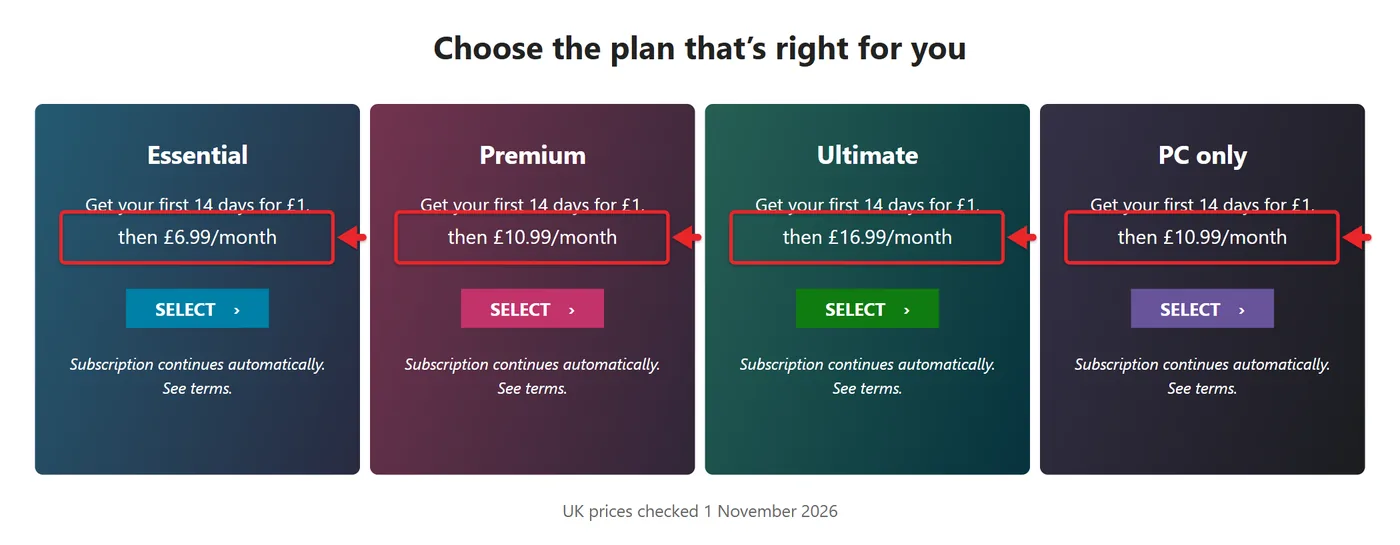
Prices checked on xbox.com on 31 October 2026. At that time xbox.com also offered the first 14 days of each plan for £1 before the monthly price applies.
Prices can change, so check the Xbox Game Pass plan comparison page before you subscribe. In April 2026, Microsoft cut the price of Ultimate and PC Game Pass. The Xbox Wire Game Pass update from April 2026 gives the new prices in dollars and notes that prices may vary by region; the UK prices above reflect that cut.
How to work out the yearly cost
xbox.com lists Game Pass prices per month, and the plans renew every month. There’s no annual plan to rely on, so the yearly cost is simply the monthly price multiplied by 12. That’s the figure in the third column of the table above. For example, Essential works out at £6.99 x 12 = £83.88 a year.
To work out your own cost, multiply the monthly price by the number of months you’ll actually subscribe. Three months of a plan costs three times the monthly price, and so on.
These totals assume the price stays the same all year. Microsoft’s small print on the Xbox Game Pass page says it gives you at least 30 days’ notice before a price increase, so you’ll have time to switch plans or cancel. If you only play online for a few months a year, you can subscribe for those months and cancel in between, which brings the yearly cost down.
Your subscription isn’t the only running cost of gaming. If you want the full picture, you can also estimate the electricity an Xbox One uses in the UK.
What each plan includes
All three console plans include online console multiplayer for paid games you own (the games are sold separately). The differences are the size of the game library, how quickly new games arrive, and how much cloud gaming you get.
| Feature | Essential | Premium | Ultimate | PC Game Pass |
|---|---|---|---|---|
| Game library | 50+ games | 200+ games | 400+ games | 300+ games (PC only) |
| New games | Not listed | New Xbox-published games within a year of launch | Day one games (not Call of Duty) | Day one games |
| Cloud gaming | 5 hours a month | 10 hours a month | 15 hours a month | Not included |
| Online console multiplayer | Yes | Yes | Yes | No |
| EA Play | No | No | Yes | Yes |
| Other extras | Rewards points | 2x Rewards | Fortnite Crew, Ubisoft+ Classics, 4x Rewards | 2x Rewards |

Two things catch people out. First, PC Game Pass doesn’t include online console multiplayer or cloud gaming, so it won’t let you play paid games online on an Xbox. Second, from April 2026, new Call of Duty games no longer join Ultimate or PC Game Pass on launch day.
Ultimate also covers PC games. If you’d like to play Microsoft’s PC titles on your console, see our guide to enjoying PC games from Microsoft on your Xbox One.
Which plan do you need?
- You only play free-to-play games: you don’t need a plan. Xbox says access to multiplayer for free-to-play games is open to every Xbox player.
- You buy your own games and want to play them online: Essential is the cheapest way to get online console multiplayer. It’s the direct replacement for Gold.
- You want a large library of games to try: Premium gives you 200+ games and twice Essential’s cloud time, for a few pounds more a month.
- You want new games the day they come out: Ultimate is the only console plan with day one releases, plus EA Play and the most cloud time.
- You only play on a Windows PC: PC Game Pass gives you the PC library. It doesn’t add console multiplayer.
A quick rule: if online play is all you want, Essential costs the least. Only pay for Premium or Ultimate if you’ll actually play the extra games.
Free things you can do without a plan
You don’t need Game Pass to use your Xbox online for everything. Without a plan, you can still:
- Play free-to-play games online.
- Buy games and play their single-player modes.
- Personalise your profile, for example if you want to change your Xbox gamertag.
- Share games you’ve bought with your household; see how sharing games on the Microsoft Store works.
How to subscribe, switch or cancel
- Open the Xbox Game Pass page on xbox.com, or the Store on your console, and sign in with your Microsoft account.
- Choose a plan and select the join button for it.
- Add a payment method and confirm. The plan renews automatically each month.
- To change or cancel, sign in to your Microsoft account’s subscriptions page and manage your Game Pass plan there. The exact button names vary.
Microsoft’s small print explains its refund rules. You can ask for a refund within 30 days of your first purchase, and you can get the most recent recurring charge refunded within 30 days, once per account for each product.
Common problems
- I still see Gold or Core on old receipts: that’s expected. Your plan moved over automatically and is now Essential.
- Online play doesn’t work with PC Game Pass on my Xbox: PC Game Pass doesn’t include online console multiplayer. You need Essential, Premium or Ultimate.
- The price on a website doesn’t match xbox.com: many older articles still list Gold at £6.99 and Ultimate at £10.99 or £12.99. Those prices are out of date. Trust xbox.com.
- A new Call of Duty isn’t in my Ultimate library: from April 2026, new Call of Duty games don’t join Ultimate on launch day.
- Cloud gaming stops partway through the month: each plan has a monthly allowance of cloud hours (5, 10 or 15 hours). Once you’ve used yours, you may need to wait for the next month or move to a plan with more hours.
- I was charged after I meant to cancel: plans renew automatically. Cancel before your renewal date, and check whether the most recent charge qualifies for a refund.
Questions
Is Xbox Live free in the UK?
The paid part of Xbox Live, Gold, has gone. You can play free-to-play games online without paying, but online play in paid console games needs Essential, Premium or Ultimate.
Can I pay for Game Pass yearly?
At the time of writing, xbox.com lists monthly prices only, so plan on paying monthly. Your yearly cost is 12 times the monthly price, for example £83.88 for Essential.
What is the cheapest way to play online on Xbox?
Free-to-play games cost nothing. For paid games, Xbox Game Pass Essential is the cheapest plan with online console multiplayer.

Matt Williams is the writer and editor behind TechInfoHome. He holds a degree in computer science and has more than 10 years of experience working in IT. For the past 5 years he has written online tutorials for Windows, Microsoft Office, Google apps and iPhone, with a focus on clear steps that get readers to a working fix quickly.